How do I set a preparation time?
The preparation time is the period during which your property cannot be booked between two reservations—for example, for cleaning or preparation.
This period is shown in the availability calendar.
You can define different preparation times depending on the seasonal period.
Step-by-step guide
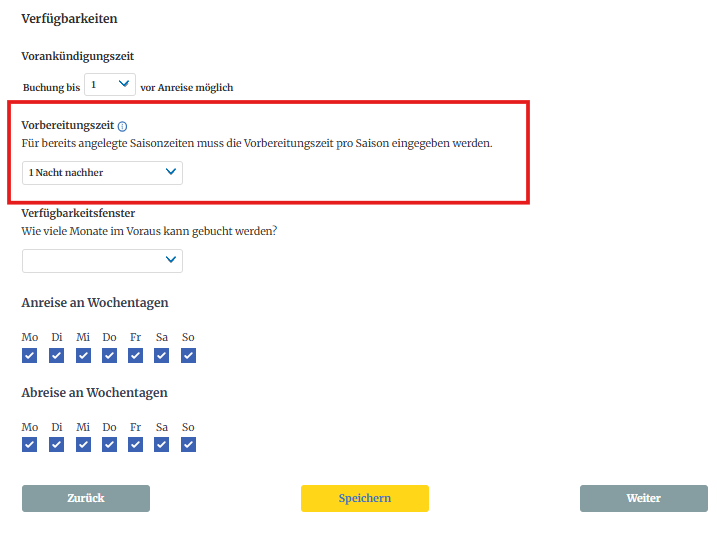
Setting the preparation time in the basic settings
- Log in to your host account.
- Select the listing you want to edit and click “Prices.”
- Under Basic settings, scroll to the “Preparation time” section and select the desired number of nights from the dropdown list (e.g., “1 night after”).
- Click “Save.”
Setting the preparation time for each seasonal period
- Log in to your host account.
- Select the listing you want to edit and click “Prices.”
- Click “Rental price calendar.”
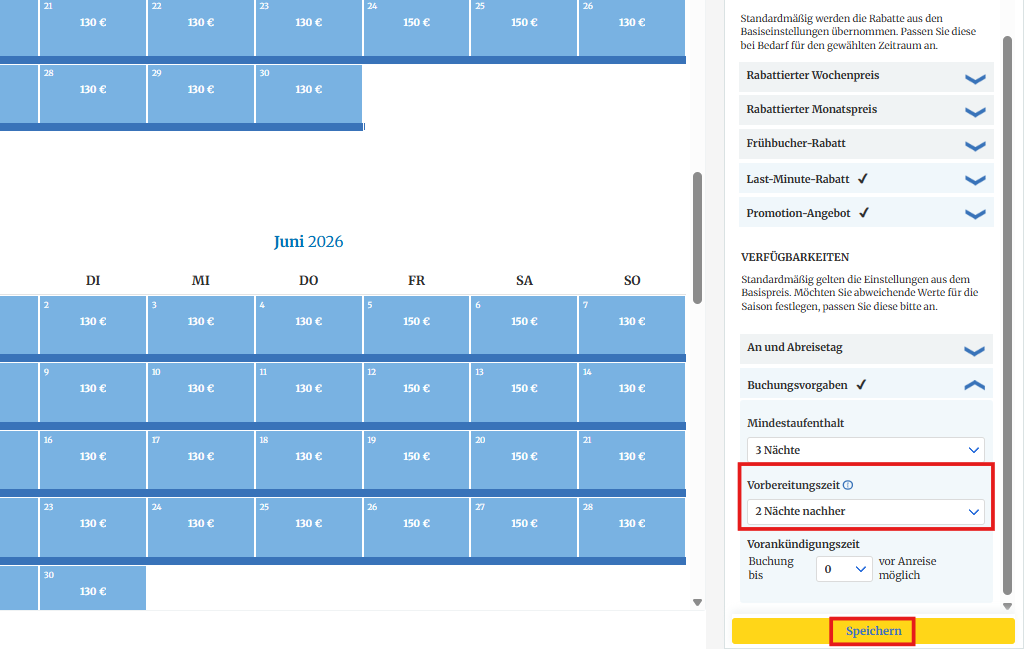
- Click the colored seasonal bar for which you want to set a specific preparation time. Seasonal periods with identical prices are displayed in the same color.
- In the right sidebar, scroll to the “Preparation time” section and select the desired number of nights from the dropdown list (e.g., “1 night after”).
- Click “Save.”
Repeat these steps for all seasonal periods where a different preparation time should apply.
Was this article helpful?
Thank you for your feedback.
Sorry to hear that. Let us know briefly what was missing – we will improve the article.
Still have questions?
Our support team will help you personally.
support@tourist-paradise.com or submit a support request